Creating logos on-screen and then having puckered garments and thread nests are frequent frustrations. Although using free software saves money when starting, open-source software doesn’t always provide the accuracy required for crisp output. Protect your garments from these problems by working with Capital Digitizing, and ensure you get professional quality every time.
What “Free” Really Means in Embroidery Digitizing
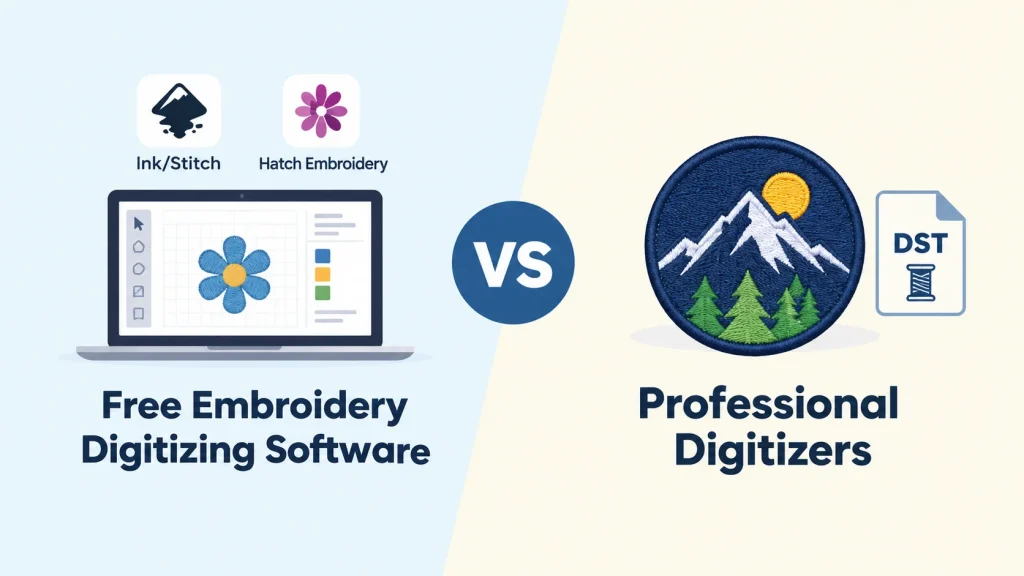
When people talk about free embroidery digitizing online or open-source solutions, they are actually referring to three main categories:
- Ink/Stitch: A completely free plug-in of an open-source type for vector images in Inkscape. You get full manual control, but there is a steep learning curve and a lot of geometry knowledge needed.
- Hatch Embroidery: Expensive commercial software providing free trials or demos. While highly efficient, it requires you to pay money after the end of the trial period.
- Browser-Based Auto-Digitizers: Online software that offers one-click conversion of images. They always fail to understand push and pull dynamics, density requirements, or even basic underlay concepts.
Ultimately, “free” simply indicates no upfront software licensing costs, but “free” does not substitute for the level of skill needed in digitizing embroidery.
Quick Comparison: Free Tools vs Professional Digitizers
| Factor | Free Tools (Ink/Stitch, Auto-Digitizers) | Professional Digitizer |
| Upfront cost | $0 | Per-design fee |
| Skill needed | High (steep learning curve) | None required on your end |
| Small text (under 5 mm) | Often unreadable or bunched | Hand-tuned for crisp legibility |
| Complex logos | Frequent structural errors | Layered, intentional stitch sequencing |
| Fabric adjustments | Manual setup or none | Precise pull compensation & custom underlays |
| Turnaround | Depends entirely on your spare time | Fast, scheduled delivery |
| Revisions | DIY troubleshooting | Included with professional service |
Where Free Tools Work Well
Free software is not useless, and we feel that we should give credit where credit is due. Free tools have real uses in the embroidery world:
- Simple, Bold Artwork: Basic geometric shapes, silhouettes, and single-color fills work great with automated stitch mapping without any big structural issues.
- Learning Core Principles: Working with free software can help beginners learn the basics of satin stitches, tatami fills, and node manipulation without spending money.
- Personal Hobby Projects: When you are working on personal projects or gifts and minor flaws won’t affect your reputation, free software is a great choice.
- Concept Prototyping: Creating the rough sketch before submitting the finished vector file to be professionally converted.
Understanding the strengths of free software will allow stitchers to set reasonable limits for what their shops can do.
Where Free Tools Fall Short
Free tools often fail when moving from basic graphics to commercial-grade embroidery digitizing. Without expert human oversight, automated tools overlook critical physical factors:
- Fabric Puckering: No underlay preparation and not considering push-and-pull effects result in outline gaps and wrinkled garments.
- Thread Breaks & Stiff Fills: Improper density settings, poorly planned travel paths, and incorrect stitch direction make needles overloaded and fills feel like cardboard.
- Illegible Small Lettering: Automated conversion tools place nodes too close to each other, making small text illegible.
- Messy Trims & Jumps: Unplanned paths cause excessive jump stitches and, therefore, unnecessary trims and a lengthy production process.
- Complex Layering & Gradients: Changes in color, shadow, and complex art require human sequencing. If you are having problems with complex art, then understanding digitizing complex logos will show you why.
- AI Limitations: Automated shortcuts are improving, but even modern AI in embroidery digitizing requires expert human supervision to fix path errors before hitting the machine floor.
The Software Trap: Why Owning Hatch Isn’t the Same as Digitizing Well
A common mistake shop owners make is assuming top-tier programs like Hatch Embroidery instantly solve digitizing issues. While premium platforms provide complete technical control, software alone cannot judge fabric stretch or needle dynamics.
- Tool vs. Skill: Software is a tool, while digitalizing is a skill. Having expensive hammers does not make one a skilled carpenter.
- The Hidden Time Cost Factor: It takes hours to edit designs, test stitches, and modify graphics. This leaves no time for marketing your business and selling your products.
- Wasted Materials: Trying things out with digital tools uses up costly materials like blank pieces, special backing, and threads.
The Real Cost: Free vs Professional
Evaluating digitizing expenses goes beyond looking at upfront software fees:
| Cost Factor | Free Route | Professional Route |
| Design Fee | $0 | Flat, affordable per-design rate |
| Ruined Test Garments | High (multiple test runs needed) | Minimal (production-ready files) |
| Your Time Investment | Hours tweaking paths and nodes | Minutes to upload and order |
| Client Order Risk | High (risk of delayed delivery) | Low (consistent, reliable runs) |
A single batch gone wrong with custom jackets will cost you more than using a reliable embroidery digitizing company to create the file right from the start.
When Should You Switch to a Professional?
Use this list to determine whether doing it yourself is helping or hurting your business:
- Customer Orders: You are stitching paid orders, commercial uniforms, or retail clothing.
- Tiny Details: Your artwork includes text smaller than 5 mm or tight detail lines.
- Difficult Fabrics: You are stitching designs on soft hats, stretchable shirts, warm fleece, or polo shirts.
- Reliable Performance: You require the same performance for 50 or 500 garments without any machine surprises.
- Frequent Issues: You face difficulties in terms of torn threads, inconsistent designs, or wrinkles in the fabric.
If your shop meets these characteristics, teaming up with Capital Digitizing will offer you professionally prepared files with manual push and pull corrections. Working with an experienced embroidery digitizing company guarantees that everything works perfectly in your embroidery machines.
Are you looking for precise fonts and perfect runs? Check out our professional embroidery digitizing service now.
Key Takeaways
Choosing between free digitizing software and professional services, it depends on the person’s preferences. Using the free software is good for studying purposes and personal projects but not for commercial projects that require precision and perfection. Working with professionals allows you to save time, eliminates waste of fabric pieces, and always gives you accurate results that can be stitched through a machine.
Capital Digitizing converts complex logos into precision-engineered, production-ready embroidery files that save time and eliminate fabric waste.
FAQs
1. Is free embroidery digitizing online good enough for business logos?
No. Free online auto-digitizers lack pull compensation, proper underlay, and density settings, which cause puckering, breakage of threads, and illegible text on commercial jobs.
2. What are the limitations of auto-digitizing tools?
Auto tools fail to take into account the stretching of the fabric, push/pull dynamics, and direction of the stitch, creating too many jump stitches, over-dense fills, and incorrectly sequenced needle-tough paths.
3. Can free software digitize small text and detailed logos?
Manual software like Ink/Stitch can, but requires manual node editing. Free one-click converters usually turn legible text smaller than 5 mm into thread clumps.
4. When should I switch from free tools to professional digitizing?
The time to change from free software to professional digitizing is when working on paid customer orders, complicated logos, small text, or difficult fabrics such as caps.
5. Why does auto-digitized embroidery often look puckered or messy?
Puckering occurs because automatic software does not consider thread tension. With no proper underlays and pull compensation, the fabric becomes distorted while being embroidered.
6. How much does professional digitizing embroidery cost compared to free tools?
Free tools cost $0 upfront but waste money on ruined blanks and labor. Professional digitizing costs a small flat fee, delivering production-ready quality instantly.