Manufacturing quality products requires more than just sending a logo. Small design mistakes cause significant production issues. Avoiding common mistakes in vector art services like improper scaling, complex paths, or poor color separation is essential. Capital Digitizing offers professional vector art services, ensuring your files are production-ready and free from costly mistakes.
Why Getting Vector Art Right Matters for Your Brand
When you give a design to a print shop or embroidery place, the type of file you use affects how good the final product will be. Vector file issues and mistakes when converting raster to vector images can cost companies dearly in terms of reprinting, shipment delays, and damage to their reputation. Choosing professional vector art services ensures your source files are properly constructed for flawless production.
- Resolution Independent: The ability to scale from a small business card to an oversized billboard on a highway with no loss of resolution using scalable vector graphics.
- Production Ready: To make use of production techniques such as embroidery, digitizing, screen printing, and large printing, you must have clean Vector Graphics files in either SVG or EPS format.
- Cost Savings: If you send files that aren’t converted properly, the system will reject them. But with vector graphics services, you can be sure that your files will be ready for print straight away. Visiting a specialized agency like Capital Digitizing helps streamline your entire digital-to-physical production setup.
Mistake 1: Submitting Low-Resolution Raster Images
Raster vs vector images vary significantly in nature since raster involves pixels that become blurry on magnification, whereas vector involves mathematical curves drawn between anchor points that can be scaled endlessly without degradation.
- Input Quality: Providing an image below 300px or a highly compressed, blurry JPG leaves the vector artist with a poor foundation regarding image quality and resolution.
- Manual Work: Bad image quality makes it difficult for designers to determine where lines end, resulting in manual editing work and common mistakes in vector art services.
- The Solution: Always check your archive for the highest quality original of your graphic (preferably 300 DPI for print design) to improve image quality and resolution.
Mistake 2: Ignoring Color Profiles in Vector Files
Color translation errors are a major problem in digital manufacturing and are the main reason why printed materials often turn out badly. There are two models of colors in the digital world, namely, RGB and CMYK. The former is for display on the computer screen, while the latter is for printing in ink.
- The Print Shift: When you directly send your RGB EPS file to a print shop, your logo will turn out darkened, intensified, or blurry in the print itself because of image quality and resolution issues.
- Production Specs: For commercial embroidery and special screen printing, we don’t use web color codes. Instead, we use actual thread colors and a color matching system known as the Pantone Matching System (PMS), used by vector graphics services.
- The Fix: Provide the format of the final product (web, apparel, or printed) so that the correct color profile can be determined and confirmed before production with scalable vector graphics.
Mistake 3: Poor Logo File Preparation Before Conversion
A common mistake is to obtain a low-quality screenshot of the client’s website or even send watermarked preview files. This lack of initial logo file preparation severely hurts the final product.
- Artifact Contamination: Screenshots compress lines, blur edges, and introduce digital artifacts that cause vector paths to end up bumpy and uneven, creating common mistakes in vector art services.
- Flattened Complexity: Flat graphics containing complex drop shadows, neon gradients, or semi-transparency cannot be easily separated if they are locked into a single background layer during logo file preparation.
- The Remedy: Provide clean, high-resolution original exports (like an uncompressed PDF or transparent PNG) when booking your logo vectorization services. Learn how artwork paths transform into stitches in this guide on digitizing complex embroidery designs.
Mistake 4: Confusing EPS Files with True SVG Format
Not all vector formats are built for the same job, and mixing them up is a very common mistake in logo vectorization services. The SVG Format is an open-standard file type optimized for web code, while an EPS file is the standard for commercial print shops.
- The Web vs Print Split: Requesting an EPS for a responsive website, or an SVG for a heavy-duty screen-printing press, can throw a wrench into production workflows handled by vector graphics services.
- The “Fake Vector” Trap: Simply opening a flat, low-res JPG and hitting “Save As EPS” does not create a vector file; it just wraps pixels inside a vector container and leads to mistakes when converting raster to vector.
- Verification Check: True scalable vector graphics must contain mathematically drawn, editable paths. Always test files by zooming in closely to ensure you do not see jagged pixels.
Mistake 5: Expecting Photo-Realistic Results from Vector Conversion
Vector Art consists of geometric lines, solid colors, and clean gradients, which highlight the fundamental differences between raster and vector images. The main purpose of vector art is to style, clean, and simplify graphics, not mimic highly detailed, realistic photographs.
- Artistic Simplification: When a client provides a highly detailed photograph expecting a precise vector copy, he is usually disappointed with the resulting posterized image.
- The Divide: Understanding the difference between raster vs vector images means understanding which to apply where; photographs remain as rasters, and logos and icons are vectors.
- Best Practice: Use vectorization only for branding logos, custom typography, crisp icons, and clean line drawings created through logo vectorization services.
Mistake 6: Not Testing Scalable Vector Graphics at Multiple Sizes
A vector logo might look completely flawless on your phone screen or a small email signature proof. However, technical errors that hide at 100% zoom will quickly expose themselves when blown up on physical production equipment, proving why proper logo file preparation is essential.
- Microscopic Errors: Unconnected paths, small overlapping spaces, and mismatched points become very obvious and unsightly when made larger due to poor logo file preparation.
- Production Risks: When cutting vinyl or doing embroidery, a stray pixel can lead to vinyl tearing, thread snapping, or damaged clothing during production due to image quality and resolution issues.
- The Protocol: Always test your scalable vector graphics by zooming in up to 800% in a vector viewer or checking how the file reads as a tiny 16px browser favicon.
Mistake 7: Skipping Professional Logo Vectorization Services
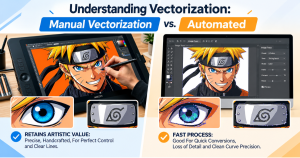
With hundreds of free automated “AI vector converters” available online, it is tempting to take the automated shortcut. However, relying on automatic tracing engines is where the vast majority of common mistakes in vector art services happen.
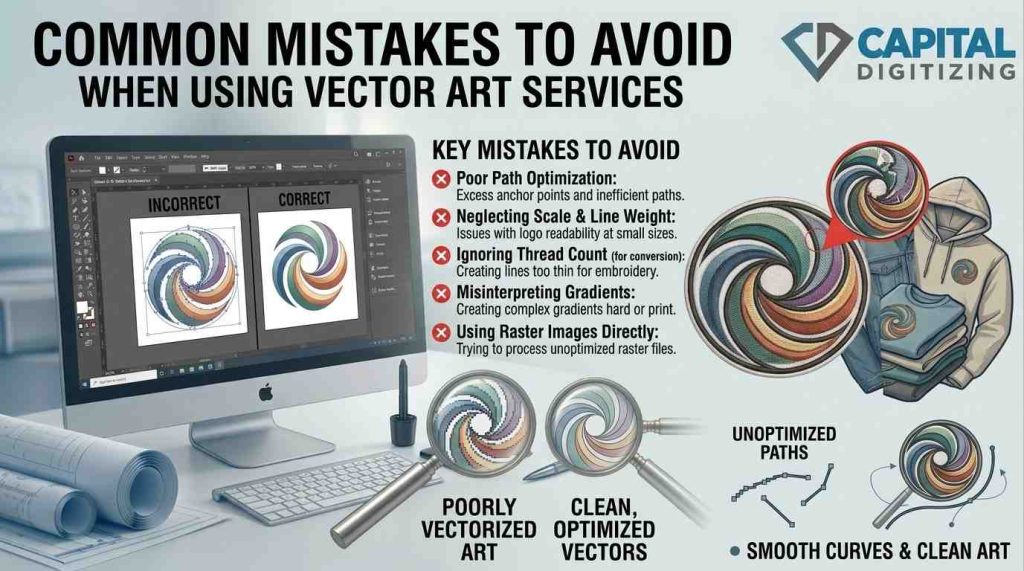
- Cluttered Code: Automated tracers cannot think like a human designer, often turning smooth curves into hundreds of jagged, unnecessary anchor points because of mistakes when converting raster to vector.
- Bloated Files: These messy paths create massive, cluttered file sizes that crash web browsers, lag print software, and make future edits a nightmare for vector graphics services.
- The Manual Value: Investing in professional logo vectorization services ensures a human designer manually retraces your artwork line by line for clean paths and perfectly separated color layers.
Raster vs Vector: Quick Comparison Table
Understanding the differences between raster and vector images helps determine the appropriate image quality and resolution for production.
| Feature | Raster Images (JPG/PNG) | Vector Graphics (SVG/EPS) |
| Scalability | Loses quality and blurs when enlarged | Infinitely scalable with zero quality loss |
| Best Used For | Real-world photography, detailed web images | Branding logos, web icons, print artwork |
| File Architecture | Pixel-based grids | Math-based paths and anchor points |
| Editability | Destructive, pixel-level adjustments only | Fully editable shapes, colors, and nodes |
| Print Readiness | Requires a strict 300 DPI minimum | Always crisp and completely print-ready |
| Embroidery Compatible | No, requires conversion first | Yes, provides a clean canvas for digitizing |
Conclusion
Avoiding these common mistakes when converting raster to vector helps connect digital design with perfect physical production. By knowing different file types, following color guidelines, and picking manual vectorization services instead of automatic ones, you can avoid expensive reprints and make sure every print job looks sharp and professional.
Elevate your production with Capital Digitizing’s expert manual vector services for flawless, scalable, professional results.
1. What are the most common mistakes in vector art services?
Submitting low-res images, ignoring CMYK profiles, using automated tracers, and confusing web SVGs with print EPS files.
2. Why do vector art conversions sometimes lose quality?
Quality drops when designers must manually guess the lines of blurry, low-resolution, or heavily compressed raster screenshots.
3. How can I avoid errors when converting images to vector format?
Provide the highest-resolution original file possible, clear transparency layers, and specify your exact final production medium.
4. Can poor vector files affect printing and embroidery results?
Yes. Messy paths cause jagged edges in printing, while unjoined lines cause thread breaks during embroidery digitizing.
5. Which file formats should I use for vector artwork?
Use EPS or PDF formats for commercial print and apparel production; use SVG formats for web-based displays.