Unusable print files usually stem from relying on software shortcuts rather than investing in professional image-to-vector conversions. Whether scaling storefront signs or prepping apparel, clean paths prevent jagged edges and vanishing details. Utilizing expert custom vector art services ensures your graphics translate flawlessly from screen to stitch, saving valuable time and production headaches.
Why Vectorization Quality Matters More in 2026
Modern brands require assets that look pristine in every kind of medium, ranging from mobiles to large billboard displays. When firms seek trustworthy vector art services, the requirement is assets that help them grow effortlessly. Low-quality vectorization results in creating bottlenecks, where embroidery stitching becomes poor, and printouts become blurry. Even a single trace becomes problematic as it requires the whole project to be retraced.
To prevent these hiccups, brands turn toward dependable vector art conversion services that prioritize image vectorization quality from the ground up. You can find out more about how to avoid common problems by looking at our guide on common mistakes in vector art services.
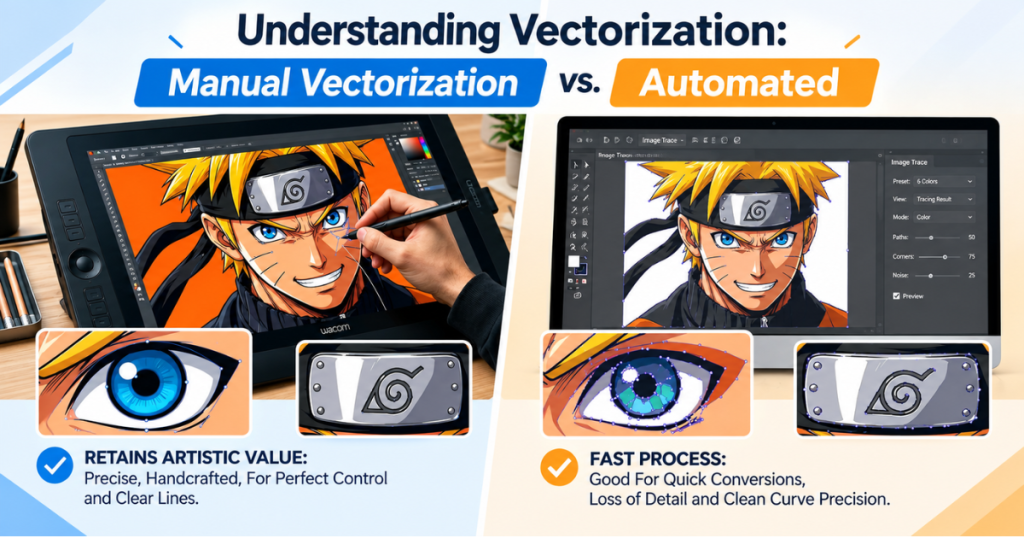
Manual Vector Tracing vs. Auto-Trace Software: Quick Comparison
Evaluating auto-trace vs manual vector workflows comes down to balancing speed against absolute precision. Automated tools give you an instant file, but a human touch ensures structural integrity.
| Factor | Manual Vector Tracing | Auto-Trace Software |
| Path accuracy | Hand-rebuilt, clean curves | Often jagged, over-noded |
| Color separation | Precise, print/embroidery-ready | Frequently merges similar tones |
| File cleanliness | No stray points, editable | Messy nodes, hard to edit |
| Best for | Logos, embroidery, print production | Rough drafts, quick previews |
| Turnaround | Slightly longer | Instant |
| Final-use readiness | High | Low without manual cleanup |
What Is Manual Vector Tracing (And Why Designers Still Do It)
Manual vector tracing is when a skilled graphic artist uses software (like Adobe Illustrator) to carefully create and draw each point, curve, and line by hand, following a regular image.
As a key part of dependable custom vector art services, this practical process offers specific benefits:
- Flawless Scalability: Because every node is placed intentionally, the resulting file has zero auto-generated clutter, keeping lines crisp at any dimension.
- Precise Color Control: Artists can explicitly separate layers and limit colors—a vital step for accurate thread matching in embroidery.
- Preserving Fine Details: Small typography, delicate flourishes, and thin strokes that automated tools typically smudge or destroy stay sharp and legible.
Ultimately, human oversight remains the backbone of dependable custom vector art services for logos, apparel graphics, and production-ready files. For a deeper look at how professional studios handle these projects, explore our core vector art services.
What Is Auto-Trace Software (And Where It Falls Short)
Auto-Trace Software (Automated Tool Comparison) relies on algorithms and raster-to-vector conversion features built into modern design software. While these utilities work wonderfully for getting a quick preview or sketching out rough concepts, they lack human intuition and cannot judge design intent.
Common issues tied to auto-trace outputs include:
- Excessive Node Bloat: Instead of a smooth curve built with a few anchor points, automated software often drops hundreds of messy nodes, making the file heavy and difficult to edit.
- Color Banding & Blending: Gradients and subtle color shifts frequently translate into choppy, fractured shapes.
- Trouble with Fine Elements: Small text and complex linework warp into illegible geometric shapes.
While auto-trace tools offer a speedy preview, relying on them for anything headed to a physical printer or embroidery machine is a risky gamble.
Auto Trace vs Manual Vector: Head-to-Head on Quality
Comparing auto trace vs manual vector side-by-side highlights why production environments favor human expertise over automated scripts:
- The Scalability Test: Manual traces scale effortlessly up to billboard sizes without warping, whereas auto-trace paths often pixelate, distort, or reveal jagged geometric flaws.
- The Color Accuracy Test: Manual tracing locks in precise brand pantones and solid fills, while auto-tracing tends to fracture minor color variations into separate, messy patches.
- The File Weight Test: Manual paths stay lightweight and organized. In contrast, automated outputs are notorious for bloating file sizes with redundant, overlapping vector points.
- The Editability Test: A clean, manually traced file can be modified by any designer in minutes. Trying to untangle an auto-traced file filled with overlapping paths often takes longer than starting from scratch.
To ensure your production partners receive files built correctly from the start, check out our guide on the best file formats for vector art services.
Where Auto-Trace Actually Works Fine
Automated vector tools still have a proper place in a designer’s toolkit—so long as expectations remain realistic. Auto-trace works reasonably well for:
- Rapid internal mockups and early concept brainstorming sessions.
- Simple, high-contrast, single-color silhouettes or shapes.
- Casual, non-production use cases where absolute perfection isn’t required.
But avoid using auto-trace shortcuts if your artwork is for embroidery machines, big signs, product packaging, or things you will give to clients.
Why Embroidery & Print Files Demand Manual Tracing
Successful embroidery digitizing & vector art services in the USA rely on clean, closed vector paths to generate smooth stitch files. An auto-traced file packed with stray nodes breaks down needle paths, causing thread breaks and distorted logos. Professional vector tracing service options ensure production-grade assets that transition seamlessly from screen to fabric.
Get Your Artwork Manually Traced →
How Capital Digitizing Delivers Vectorization Quality
To create clear and ready-to-use artwork, you need a mix of practical experience and skilled work. We don’t depend on fast automated programs or messy software outputs. Every file submitted to our team goes through a rigorous manual workflow:
- In-House Human Tracing: Our skilled designers manually trace every single path to guarantee clean lines and correct proportions.
- Strict Quality Audits: Before delivery, we inspect files for path cleanliness, precise color counts, and absolute scalability.
- Reliable Turnaround: We provide fast delivery times without cutting corners, helping brands relying on online vector art conversion services keep their production schedules on track.
Visit the Best embroidery digitizing company →
Conclusion
Production environments demand precision that algorithms simply cannot deliver. While auto-tracing software offers quick drafts, manual vector tracing guarantees smooth lines, correct colors, and perfect scalability for printing or embroidery. By hiring expert humans, companies save themselves from expensive production stops and ensure perfect outcomes every time.
Capital Digitizing ensures flawless production quality by pairing expert manual vector tracing with rigorous multi-step quality audits.
FAQs
1. What’s the difference between manual vector tracing and auto-trace software?
Manual tracing uses human precision for clean paths, while auto-trace relies on algorithms that often create messy nodes.
2. Why do auto-traced images often look rough or inaccurate?
Automated tools lack design intent, frequently resulting in excessive node bloat, jagged edges, and color banding.
3. Is manual vector tracing more expensive than software-based tracing?
While software tools are free or cheap, manual tracing requires labor time but saves costly production errors later.
4. Which method gives cleaner results for complex logos?
Manual vector tracing consistently delivers clean, editable curves and flawless detail preservation for intricate logos.
5. Can auto-traced files be fixed manually afterward?
Yes, but untangling heavy, overlapping automated paths often takes longer than starting a fresh manual trace.
6. How do I know if my vector file was manually traced or auto-generated?
Check the anchor points; clean paths use minimal nodes, whereas auto-generated files feature dense, chaotic node clusters.