When outsourcing to professional vector art services, receiving the wrong final file format causes major production headaches and unexpected reprinting costs. To guarantee crisp, infinitely scalable results for banners and branding updates, your artwork must be built using flexible mathematical formulas rather than rigid pixels. Custom vector conversion services make your work smoother by offering you the precise files needed by your machines.
What Are Vector File Formats and Why Do They Matter?
Unlike common JPEG or PNG images that consist of a fixed quantity of small dots (pixels), vector images are created through math formulas.
- Infinite Scaling: Such math enables you to increase or decrease the size of your artwork without losing its quality.
- Production Rejections: Using the wrong format can quickly result in design rejections at printing shops, embroidery places, and sign makers.
- Zero Delays: Our professionals’ vector graphics services team eliminates these delays because we give you your asset in the precise format that your equipment needs.
- Total Support: To make things easy for you, Capital Digitizing offers full support to the SVG format, in addition to EPS, AI, PDF, and high-quality PNG file formats through dependable vector conversion services.
Quick Comparison: Top 4 Vector Formats at a Glance
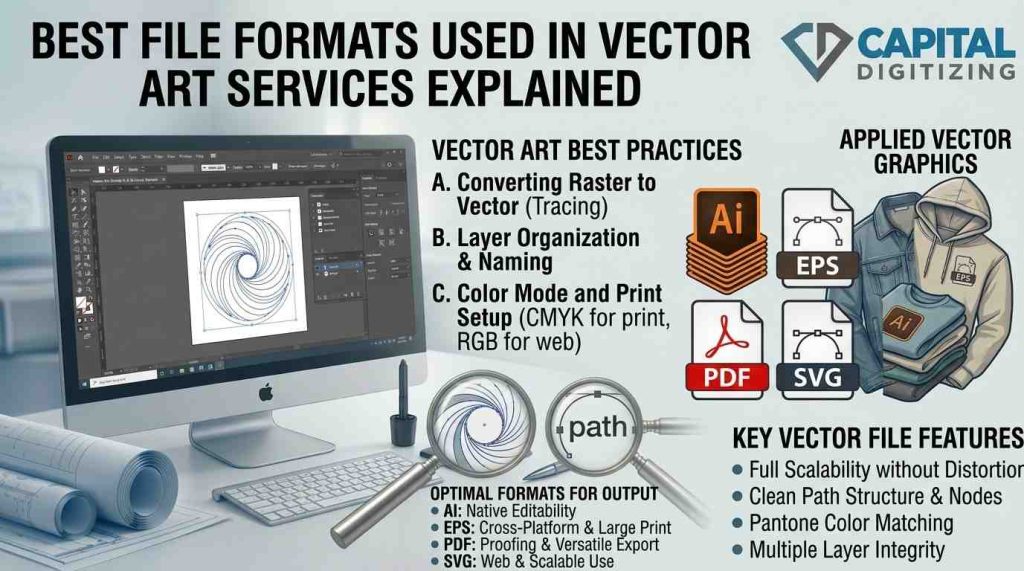
Picking the best choice depends on where your artwork will be displayed. Our vector conversion services build clean, production-ready assets tailored to these structural capabilities:
| SNO | Format | Best Use | Editable | Print-Ready | Universal |
| 1 | SVG | Web, UI, digital layouts | ✅ | ❌ (mostly) | ✅ |
| 2 | EPS | Commercial print, signage | ✅ | ✅ | ✅ |
| 3 | AI | Logo editing, source | ✅ | ✅ | ❌ (Adobe only) |
| 4 | Sharing, proofs, and clean printing | ✅ | ✅ | ✅ |
1. SVG Format: Best for Web & Digital Use
When working with premium custom vector art services, you will quickly discover that the SVG format (Scalable Vector Graphic) is an XML-based layout built specifically for digital screens. It is highly valued across modern vector graphics services because it loads quickly and renders beautifully on any mobile device or desktop monitor.
- Responsive Design Standard: Ideal for responsive websites, interactive mobile apps, user interface icons, and online animation.
- Browser Native Performance: Clean XML code allows internet browsers to scale and render the artwork instantly without plugins.
- Production Limitations: Not designed for traditional CMYK commercial print presses; optimized instead for DTG, DTF, and web use.
Verdict: Best format for clients needing digital-ready vector graphics.
2. EPS Files: Best for Print & Large-Format Output
When dealing with professional vector conversion services, old EPS files (Encapsulated PostScript) are still a dependable choice for printing commercial materials. Since it was created in the 1980s, it has been the main standard used for printing around the world.
- Color Accuracy Protection: Keeps complex CMYK color profiles safe, so colors stay consistent when printed.
- Cross-Platform Accessibility: It opens easily in popular vector editing programs like Adobe Illustrator and CorelDRAW.
- Vendor Compatibility: Uniformly demanded by independent commercial screen printers, industrial sign builders, and computerized embroidery studios.
Verdict: Best format for any client sending artwork to a physical print vendor.
3. AI File Format: Best for Editable Logo Work
For businesses seeking custom vector art services, keeping an unflattened AI file format (Adobe Illustrator) on hand is a critical business practice. This is the master source format where your complex vector graphics services are initially drawn, layered, and organized.
- Complete Layer Control: Maintains the original, unmerged shapes and editable text so you can make changes later.
- Advanced Production Features: Compatible with all professional colors, such as digital RGB colors, CMYK print colors, and Pantone color guides.
- Software Constraints: This file format is designed exclusively for Adobe Illustrator. Thus, it requires special software for opening, editing, and saving.
Verdict: Perfect for organizations seeking full control over the design after its delivery.
4. PDF Vector Files: Best for Universal Sharing & Proofing
Many clients are shocked to find out that regular PDF vector files can keep detailed vector information if they are saved correctly from professional design programs like Illustrator or CorelDRAW. This ability to work on different platforms makes it a great tool for daily business communication using vector art services for logo file conversion.
- Universal Viewability: Opens perfectly across all modern mobile and desktop operating systems without requiring any vector design tools.
- Asset Self-Containment: Embeds fonts, vector paths, and exact color data into the file, eliminating issues with missing links.
- Direct Print Compatibility: Allows commercial print shops to run production jobs straight from the file without technical formatting steps.
Verdict: Best format for sharing final artwork with non-designers or print vendors.
Which Format Should You Request From Your Vector Art Service?
To help streamline your ordering process when using our custom vector art services, use this quick reference chart to align your project goals with the proper engineering format:
| Your Exact Use Case | Request This Specific Format |
| Publishing onto a website, blog, or mobile app | SVG |
| Commercial screen printing, signs, or vehicle wraps | EPS or PDF |
| Editing layouts, changing text, or modifying shapes in-house | AI |
| Sending a visual layout to a third-party manufacturer or vendor | PDF or EPS |
| Prepping a logo file for computerized embroidery digitizing | EPS or AI |
No matter what raw file type you currently have, Capital Digitizing accepts your original files and handles the technical execution to deliver the clean vector output your business needs through efficient vector art services for logo file conversion.
How Capital Digitizing Handles Vector File Conversion
When you need to hire vector art services for logo file conversion, Capital Digitizing removes the guesswork from the process.
- Acceptance: We take low-resolution JPEGs, pixelated PNG screenshots, old PDFs, and scanned sketches for our vector conversion services.
- Manual Precision: Our workflow completely avoids cheap auto-tracing software. Professional artists trace and redraw every curve by hand to guarantee clean lines for our custom vector art services.
- Embroidery Readiness: Properly formatted vector files are crucial because understanding why digitizing embroidery is important for high-quality stitching ensures your clean lines translate into flawless, pucker-free threadwork on physical fabric.
- Fast Execution: We handle regular vector orders quickly within our standard vector graphics services workflow.
- Custom Deliverables: We provide file packages in SVG, EPS, AI, PDF, and CDR formats based on what you need for your project when utilizing our vector art services for logo file conversion.
- Versatile Range: Our custom products are great for promotional clothing, screen printing, custom patches, and signs for buildings.
Conclusion
Picking the right vector format helps keep your brand safe from expensive production delays and makes sure your display looks good, whether it’s physical or digital. If you need flexible SVGs for websites, strong EPS files for printed materials, or editable AI files, choosing the right type helps you work better and faster. Capital Digitizing takes away the uncertainty by carefully changing your low-quality images into clear, ready-to-use vector files that fit your needs.
Capital Digitizing manually transforms low-resolution images into flawless, production-ready vector files tailored perfectly to your equipment’s specifications.
1. What is the best file format for vector art services in logo design?
The AI format is best because it preserves layers and paths for future editing.
2. How do vector art services choose the right file format for projects?
They evaluate whether the final artwork is intended for digital screens or physical printing.
3. Do vector art services provide multiple file formats for clients?
Yes, professional services deliver comprehensive packages containing AI, EPS, SVG, and PDF files.
4. What file format is best for printing in vector art services?
The EPS file format is the industry standard for commercial and large-scale printing.
5. How do vector art services ensure file compatibility across platforms?
They supply universally accessible formats like PDF and EPS alongside proprietary source files.